The UTMB Health physician and provider directory now includes an AI-powered search option. This feature is fully functional, but as a new tool, it will continue to improve over time.
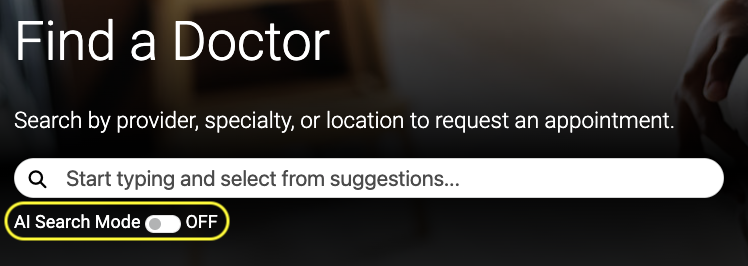
AI Search is ON by default. When AI Search on, you can type open-ended questions or simple terms for conditions, services, or symptoms to find the care you need.
It uses your words to match you with the most relevant providers and specialties, then displays results by earliest available appointment.
You also have the option to toggle off AI Search. With AI turned off, you can still do a conventional search for providers and specialties.
AI Search Query Examples
- “What kind of doctor do I see for hip pain?”
- “Pediatrician near League City”
- “Wrist injury after fall”
- “Diabetes specialist”
- “Sports physical for teenager”
- “Well woman exam”
AI Search Tips
- Avoid oversimplified or one-word searches. For example, use “ear pain” instead of “ear.”
- Spell out conditions. Abbreviations may not return results.
- Include the patient’s age to help identify pediatric or adult providers.
- Use “Refine Search” and “Advanced Filters” to narrow your results.
- Review each provider’s profile, background, and services to find the best fit for your care.
Security & Privacy
- AI Search does not store your information.
- It does not affect your privacy.
- It can be turned off at any time and you can switch back to standard search whenever you prefer.

Questions or Feedback?
Help Us Improve
Have feedback about the directory or AI Search? We’d love to hear from you.
Prefer to Speak with Someone?
Our Access Center is available 24/7 at (800) 917-8906 to answer questions and help schedule appointments.
Emergency Care
If you are experiencing a medical emergency, please visit your nearest emergency room.